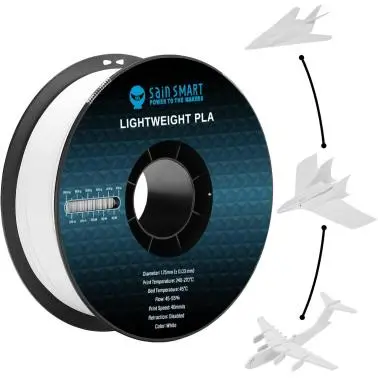
Description

SainSmart LW-PLA (Lightweight PLA) is a 3d printing material specially developed for aeromodelling drones and cosplay. Compared with regular PLA Filament, printing with the LW-PLA Filament delivers a lighter wing load and a lower stall speed to your aircraft models. With a better balance between strength and weight, it also brings better performance to your models.
Features

Lightweight
With active foaming technology, this LW-PLA filament delivers low-density and light weight parts.

Active Foaming
The maximum foaming rate of this LW-PLA filament is 220%, which means when printing models of the same volume, 1 roll of LW-PLA can be used as 2.2 rolls of ordinary PLA.

Smooth Finish
The foaming feature of it also makes it possible for almost invisible layer lines and a smooth matte finish.

LW-PLA has a more stable interlayer bonding, and the expanding rate, density and strength of which can be controlled by adjusting the printing temperature.
 SainSmart LW PLA v.s. Other LW PLA
This material starts to foam and expand when printing above 210 , the prints volume can increase by nearly 1.2 times, the printing extrusion rate can be reduced to max of 45% to print lightweight parts.
 Printing Tips:
- The initial layer print speed and extrusion rate should be the same as print speed and extrusion rate settings, changes in print speed will also change the expansion rate of this material and cause layer lines. If the prints stick too firm to the build plate and unable to remove. please consider adding a raft.
- Pay attention to the maximum operating temperature of your 3d printer, most 3d printers with Teflon Heatbreak tube cannot run above 250 for a long time, or melting and blockage may occur. If you need to print above 250 constantly, we recommend you use high-temp Full Metal Hotend 3d printer.
- It is normal for Highly expanded prints to yellow. To reduce this effect, reduce expansion and print at lower temps.
- LW-PLA will continue to foam in the melt zone of the nozzle, so retraction does not work in this circumstance, and your 3d printer will continue to print even when the extruder crosses an empty space and cause stringing. We recommend you print in vase mode.
- Printing temperature, speed, and nozzle melt zone size will all affect the foaming ratio, so you need to adjust the wall thickness, extrusion rate, temperature, speed, and other settings according to your models and printers.
Explore more from our collection.
![Asus Zenwifi Xd5 Ax3000 Wi-Fi 6 Mesh System [2 Pack] 1](https://autopartsready.shop/wp-content/uploads/2026/05/662311-Product-0-I-638355301808322811-LvUWQC.tmp_.webp)
Reviews
There are no reviews yet.